Training Requirements By Question Report
The Training Requirements by Question report shows the average score for each user by each selected question on the selected scorecard.
Report Parameters
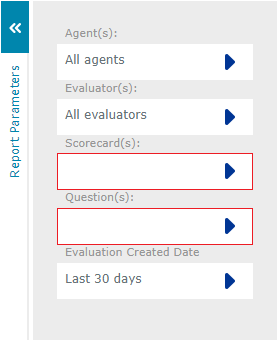
Click the  icons to bring up a dialog to edit each report parameter. The following report parameters are available for a Training Requirements report:
-
Agents to filter report results by selected users or all users. The user list contains users that have an Agent Evaluation license and are managed by the logged in user. Administrators are presented with all users that have an Agent Evaluation license.
-
Evaluator to filter report results by evaluator or all evaluators.
|
You can use the Department, Location and Status filters in the User and Evaluator dialogs to restrict the user data displayed. |
-
Scorecard to filter report results by scorecard. You must select a scorecard to run this report, selecting all scorecards is not an option.
-
Question to filter report results by question, question category or include all questions. Selecting a question will include only the selected question in the report results. Selecting a question category (highlighted in green) will include all questions in that category in the report results. Selecting all questions will include all questions from the selected scorecard in the report results.
-
Evaluation Created Date to filter report results by evaluation created date or all dates. The date criteria has the following options:
-
Any to include all evaluations.
-
Last X Days to enter the number of days of data to display, counting back from today. Enter an integer in the range 0 to 10000, with 0 representing today.
-
Range to define start and end dates using the calendar provided.
-
See Also: