Authentication Flows
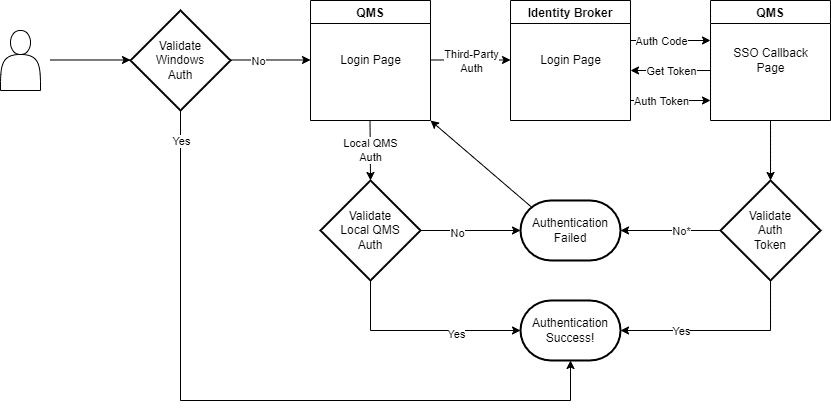
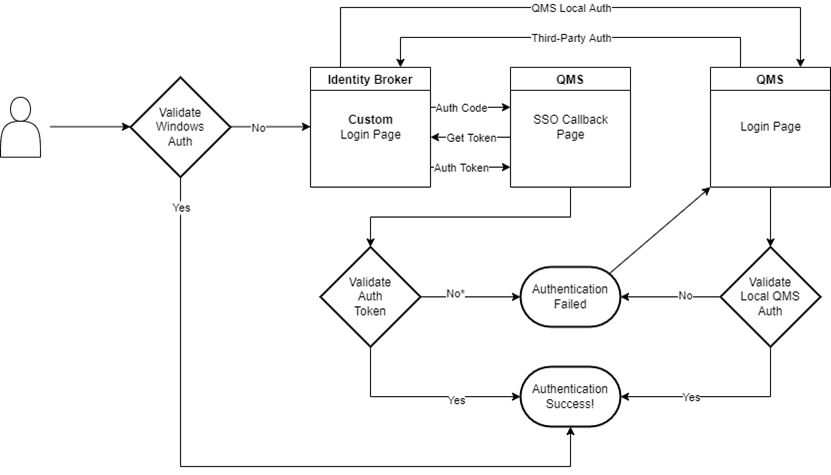
QMS has three authentication options which can all co-exist together on the same server: Local QMS Authentication (always enabled), Windows Authentication and Third-Party Authentication. The latter two are configurable and are off by default. Third-Party Authentication has two authentication flow options, Standard or Third-Party First.
Standard Authentication Flow
The standard flow checks for Windows Authentication first (if enabled), then the QMS Login Page is presented where the user can select either Local QMS Authentication or Third-Party Authentication. The downside of this flow is where the Third-Party Identity Provider is used by other Enghouse applications that integrate with QMS, the flow is not as seamless as it could be when a user moves from another Enghouse application to QMS (because the QMS login page will get in the way).
Third-Party First Flow
The Third-Party Flow is a better solution when the Third-Party Identity Provider is shared by other Enghouse applications that integrate with QMS, because the authentication is seamless if the user has already authenticated with the Third-Party before arriving at QMS. The downside of this flow is where the user is unable to authenticate with the Third-Party provider there is no way to access QMS via the local authentication unless the Third-Party login page is customised to include a link back to the local QMS login page. Therefore we only recommend this flow if a custom login page is able to be created on the Third-Party Identity Provider.
Third-Party Authentication and QMS Tenants
In a multi-tenant QMS system, each tenant is allowed to have their own third-party authentication settings, thus enabling each tenant to configure different third-party authentication providers. However in order to achieve this, each tenant must run in their own virtual directory on the QMS web server. You can configure tenant virtual directories from the QMS administration website.
For more information on configuring Third-Party Authentication in QMS refer to the User Guide’s Third-Party Authentication Settings page.