Cisco CUBE Configuration
Configuring the CUBE device to use SipRec with QMS involves creating several constructs in the CUBE configuration. Making a call a candidate for recording via SipRec in QMS requires that the inbound or outbound dialing peer servicing call have a media-class (222) assigned that defines a SipRec recorder. The call must also have a voice-class assigned that names a QMS specific sip-copylist (9999). The media-class (222) names a media profile for the recorder (200), The media profile for the recorder names a dial-peer that routes to the recorder (2000), QMS in this case. Additionally, the dial-peer that routes to the recorder is required to have a voice class assigned naming a QMS specific sip profile (9998). These relationships are depicted in the following diagram, where the voice dial-peer named "41" has been configured to engage QMS to record calls traversing it. The sip-copylist (9999) and sip-profile (9998) are constructs that allow select SIP headers to be copied from the initial invite that traverses a dial-peer tagged for recording, to the initial invite sent to the recorder to establish the recording session. These headers are used by QMS to gather metadata for the call; for example, whether the call was inbound or outbound with respect to a user. The sip-copylist (9999), assigned to dial-peer 41, causes the CUBE to make a copy of the From, To and Remote-Party-ID headers, so that they are available for processing in the sip-profile (9998) that is assigned to the dial-peer routing to the QMS installation. The sip-profile (9998) takes the three headers that were copied by the sip-copylist and creates new non-standard headers on the initial Invite leaving the recorder dial-peer named OriginatingTo, OriginatingFrom and Remote-Party-Id with values from the headers copied by the copylist.
The identifiers used in this example, 41, 200, 222, 2000, 9998 and 9999 don’t have any significance, they could be any valid Cisco identifier, they can be changed as long as they are changed consistently.
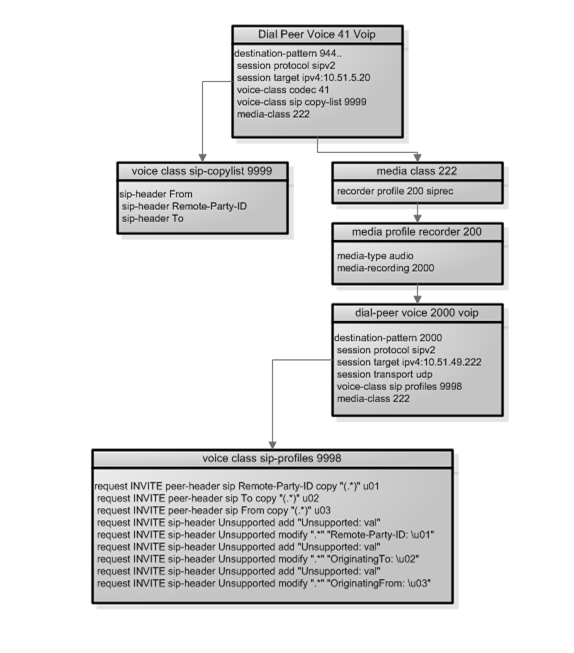
CUBE Configuration Constructs related to recording configuration.
The following steps detail setting up this configuration at the CUBE via the Cisco command line interface (CLI) over an SSH terminal. Italicized text preceded by // is an inline comment and not intended to be part of a command. The string USACHI-LAB-ISR> and USACHI-LAB-ISR# are command line prompts.
USACHI-LAB-ISR>enable                                          // Enter privileged mode.
USACHI-LAB-ISR#configure terminal                               // Enter configure mode.

// Create the copylist 9999
USACHI-LAB-ISR(config)#no voice class sip-copylist 9999          // Delete any sip-copylist named 9999
USACHI-LAB-ISR(config)#voice class sip-copylist 9999              // Create the copylist 9999
USACHI-LAB-ISR(config-class)#sip-header From                       // Include From, To, etc.
USACHI-LAB-ISR(config-class)#sip-header Remote-Party-ID
USACHI-LAB-ISR(config-class)#sip-header To
USACHI-LAB-ISR(config-class)#exit                                   // Exit config-class mode.

// Create the SIP profile 9998
USACHI-LAB-ISR(config)#no voice class sip-profiles 9998            // Delete any sip-profile named 9998
USACHI-LAB-ISR(config)#voice class sip-profiles 9998                // Create the profile 9998 add rules.
USACHI-LAB-ISR(config-class)# request INVITE peer-header sip Remote-Party-ID copy "(.*)" u01
USACHI-LAB-ISR(config-class)#request INVITE sip-header Unsupported add "Unsupported: val"
USACHI-LAB-ISR(config-class)#request INVITE sip-header Unsupported modify ".*" "Remote-Party-ID: \u01"
USACHI-LAB-ISR(config-class)#request INVITE peer-header sip To copy "(.*)" u02
USACHI-LAB-ISR(config-class)#request INVITE sip-header Unsupported add "Unsupported: val"
USACHI-LAB-ISR(config-class)#request INVITE sip-header Unsupported modify ".*" "OriginatingTo: \u02"
USACHI-LAB-ISR(config-class)#request INVITE peer-header sip From copy "(.*)" u03
USACHI-LAB-ISR(config-class)#request INVITE sip-header Unsupported add "Unsupported: val"
USACHI-LAB-ISR(config-class)#request INVITE sip-header Unsupported modify ".*" "OriginatingFrom: \u03"

// Create a SIPREC recorder profile 200
USACHI-LAB-ISR(config)# media profile recorder 200
USACHI-LAB-ISR(cfg-mediaprofile)# media-type audio
USACHI-LAB-ISR(cfg-mediaprofile)# media-recording 2000
USACHI-LAB-ISR(cfg-mediaprofile)# exit

// Create the media class that points to SIPREC recorder profile 222
USACHI-LAB-ISR(config)# media class 222
USACHI-LAB-ISR(cfg-mediaclass)# recorder profile 200 siprec
USACHI-LAB-ISR(cfg-mediaclass)# exit

// Create the outbound dial-peer that points to the recording server 2000
USACHI-LAB-ISR(config)# dial-peer voice 2000 voip
USACHI-LAB-ISR(config-dial-peer)# media-class 222
USACHI-LAB-ISR(config-dial-peer)# destination-pattern 2000
USACHI-LAB-ISR(config-dial-peer)# session protocol sipv2                    // Protocol is sipV2 over udp.
USACHI-LAB-ISR(config-dial-peer)# session target ipv4:10.51.49.222          // IPV4 address of the QMS server.
USACHI-LAB-ISR(config-dial-peer)# session transport udp                     // Protocol is sipV2 over udp.
USACHI-LAB-ISR(config-dial-peer)# voice-class sip profiles 9998             // Assign QMS specific profile to dial peer.
USACHI-LAB-ISR(config-dial-peer)# exit

// Add the media-class and copylist to any dial-peers where calls are recorded. 41 in this case.
USACHI-LAB-ISR(config)# dial-peer voice 41 voip
USACHI-LAB-ISR(config-dial-peer)# media-class 222                          // Assign the recording enabled media class.
USACHI-LAB-ISR(config-dial-peer)# voice-class sip copy-list 9999           // Assign QMS specific copylist to dial peer.
USACHI-LAB-ISR(config-dial-peer)# exit