Avaya IPOffice Configuration
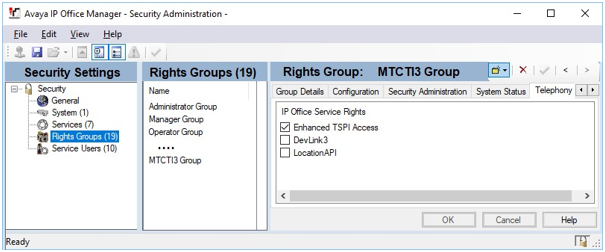
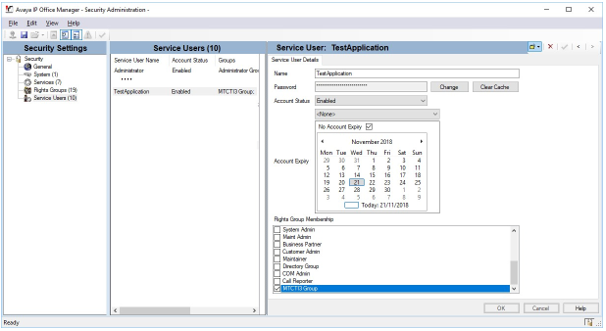
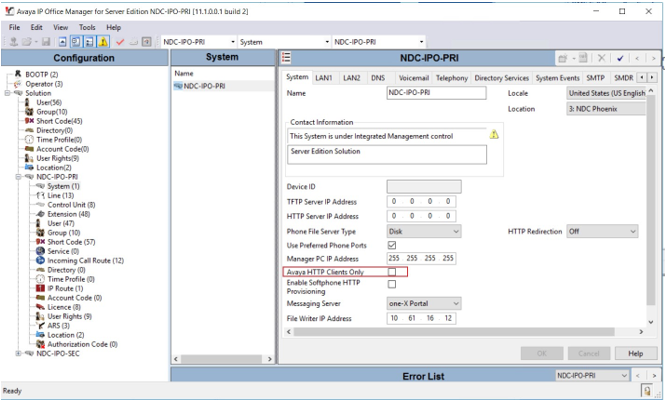
The QMS Recording Service requires an Avaya Service User to be configured with "Enhanced TSP Access" rights. The IP Office must also have the "Avaya HTTP Clients only" flag disabled.
First configure a Rights Group, with access rights to the "Enhanced TSPI Access" service:
Then create Service User account which is a member of this group:
Ensure that the "Avaya HTTP Clients Only" flag is not enabled:
|
A CTI Link Pro license is required to use the MTCTI-3 API with Avaya IP Office. If you are using a secondary IPO for resiliency, you will need a second CTI Link Pro license for the secondary IPO. |
|
If you are using a secondary IPO for resiliency, you will need to make sure the Rights Group and Service User also exist on the secondary IPO and ensure that "Avaya HTTP Clients Only" is not enabled. |
Enabling SNMP Support on IP Office
To enable SNMP support on IP Office, complete the following steps.
-
Open System > System Events > Configuration and click the SNMP Enabled checkbox.
-
Type a name in the Community field. It is recommended that you type in public.
-
Type 161 into the SNMP Port field as the default.
-
In the left pane select Firewall Profile and double-click Internet01.
-
In the SNMP drop-down select Bothway. This enables IP Office to receive and send SNMP requests.
-
Restart IP Office for the changes to take effect.