QMS Reindex
What does reindexing do?
A reindex rebuilds a tenant’s Meilisearch index from scratch. QMS deletes the tenant’s existing index and recreates it, then re-processes every one of that tenant’s eligible recordings - transcriptions, chats, emails, and UC messages - back into the freshly created index.
A reindex is normally not needed for day-to-day operation, since new recordings are indexed automatically as they’re finalized. It’s useful in situations such as:
-
Recovering a tenant’s index after data loss or corruption on the Meilisearch instance.
-
Populating full text search for a tenant’s historical recordings after enabling the feature for the first time.
-
Rebuilding an index after a change that affects how documents are indexed.
|
Starting a reindex deletes the tenant’s existing Meilisearch index immediately. Full text search returns no results for that tenant until the reindex has processed enough recordings to repopulate it. |
Starting a reindex
Reindexing is managed from the tenant’s own configuration page (list of tenants → tenant), under "Full Text Search and Index Settings":
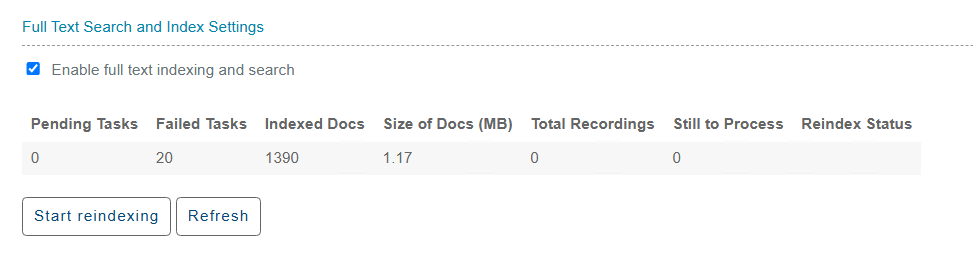
On a single-tenant installation, the same controls appear alongside the connection settings on the General Settings page instead:
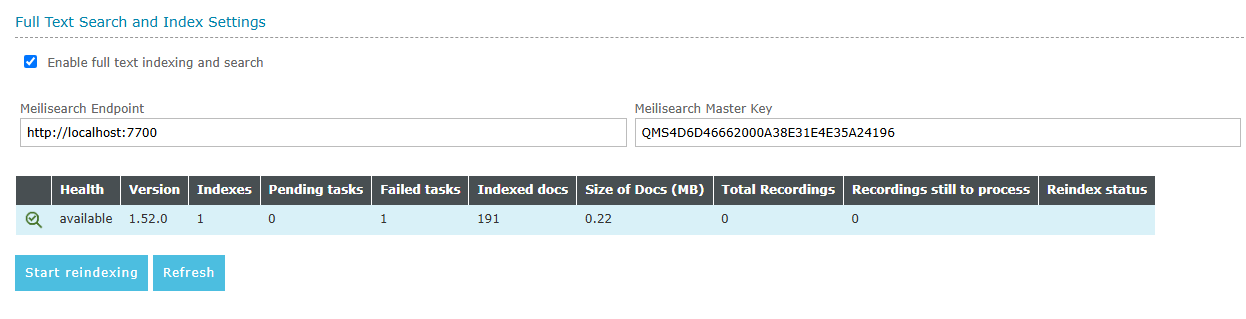
Click "Start reindexing" to begin. QMS creates a new reindex task for the tenant and starts working through it in the background.
|
Only one reindex task is processed at a time per QMS Data Service installation. If reindexing is requested for more than one tenant, each tenant’s reindex is completed in turn, one at a time, rather than running concurrently. |
Reindex status and statistics
Pending Tasks |
The number of Meilisearch tasks still queued or in progress for this tenant’s index. |
Failed Tasks |
The number of Meilisearch tasks that have failed for this tenant’s index. |
Indexed Docs |
The number of documents currently indexed in this tenant’s index. |
Size of Docs (MB) |
The approximate size, in megabytes, of this tenant’s indexed documents. |
Total Recordings |
The total number of recordings eligible for indexing for this tenant. |
Still to Process |
The number of this tenant’s recordings not yet indexed. |
Reindex Status |
Shows "ongoing" while a full reindex of this tenant is in progress; empty otherwise. |
Click "Refresh" to reload these statistics without starting a new reindex.
How reindexing works
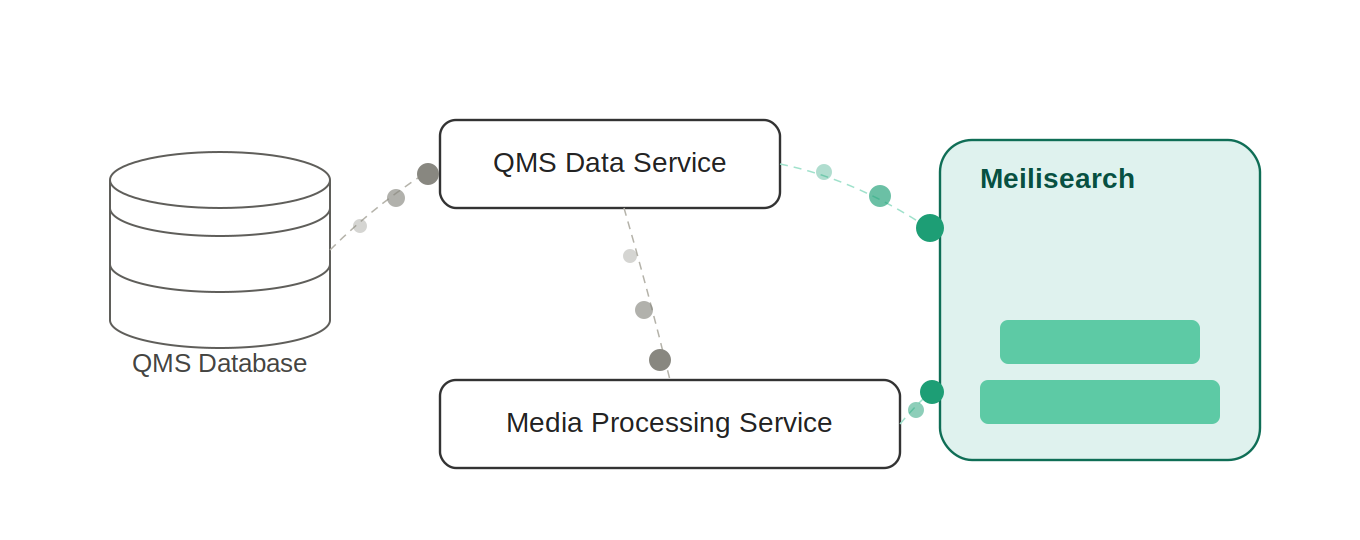
Reindexing is carried out by QMS’s maintenance cycle rather than all at once, so it doesn’t block or slow down other QMS operations:
-
Recordings are processed in batches. The batch size defaults to 1000 recordings, and can be configured (from 50 to 50.000) in the QMS Config tool - the underlying parameter is
NrDocsToReindexPerCycle, in the Data Service folder. -
Each batch is split by data source and handled by the QMS Data Service or Media Processing Service, whichever manages that data source, which retrieves the recording’s text content and builds a Meilisearch document for it.
-
Documents are sent to Meilisearch in smaller chunks if a batch is large. Recordings whose document couldn’t be created are marked as failed rather than being sent to Meilisearch.
-
On the next maintenance cycle, QMS checks the status of everything sent to Meilisearch and updates each recording’s status accordingly (completed or failed).
-
The reindex task itself moves from "ongoing" to complete once every one of the tenant’s recordings has reached a final status.