Total Counts Reports
The Total Count Report shows call volume data.
Report Parameters
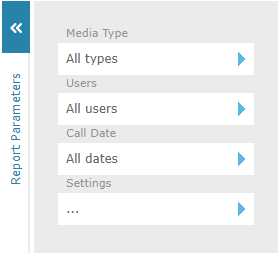
Click the  icons to bring up a dialog to edit each report parameter. The following report parameters are available for a Total Count report:
-
Media Type to report on all recording types (default) or restrict by media type.
-
Users to filter report results by selected users or all users.
|
You can use the Department, Location and Status filters in the User and Evaluator dialogs to restrict the user data displayed. |
-
Call Date to filter report results by call start date and time or all dates. The date criteria has the following options:
-
Any to show all call records, without any date or time restrictions.
-
Last X Days to enter the number of days of data to display, counting back from today. Enter an integer in the range 0 to 10000, with 0 representing today.
-
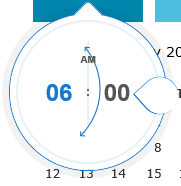
Range to define start and end dates using the calendar provided, then optionally start and end times using the "time dropper" control. Move the teardrop around the circle to increase/decrease the time. Click on the minute value to switch to incrementing by minutes and vice versa by clicking on the hour value.
-
-
Settings for additional report parameters:
-
Date Grouping to group the call data based on the year, month, week, day, day of week, hour of day, or half hour of day.
-
Grouping to further group the call data based on area code, prefix, recording profile, extension, DNIS, Department, Location, or flag.
-
Sorting to sort the call data by date, group, calls, or talk time.
-
Limit to set the amount of data to be displayed, or 0 to set no limit.
-
Call Direction to filter report results to include incoming, outgoing, or both directions of call.
-
See Also: