Defining Full Text Search Criteria
The full text search criteria bar contains all the available search parameters to allow you to perform a full text search of recordings.
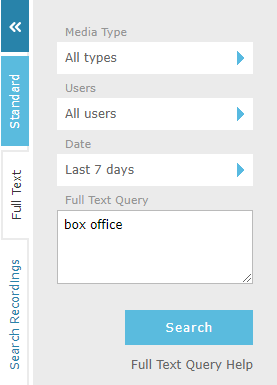
|
Use the |

Click the  icons to bring up a dialog to edit each type of search criteria. The following types of search criteria are available:
-
Media Type to return all text-based media types (default) or restrict by media type.
-
Users to restrict search results by selected users or all users.
|
You can use the Department, Location and Status filters or the Search box in the User dialog to restrict the user data displayed. |
-
Date to restrict search results by recording start date and time or all dates. The date criteria has the following options:
-
Any to show all call records, without any date or time restrictions.
-
Last X Days to enter the number of days of data to display, counting back from today. Enter an integer in the range 0 to 10000, with 0 representing today.
-
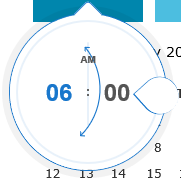
Range to define start and end dates using the calendar provided, then optionally start and end times using the "time dropper" control. Move the teardrop around the circle to increase/decrease the time. Click on the minute value to switch to incrementing by minutes and vice versa by clicking on the hour value.
-
-
Full Text Query to enter the search query:
Full text search is provided by Meilisearch. A query is broken up into words, and recordings containing the words are returned. There are two types of terms: single words and phrases.
-
A single word is a single word. Matching is tolerant of small typing mistakes, so a word with a minor misspelling will still find recordings containing the correct spelling.
-
A phrase is a group of words surrounded by double quotes such as "hello dolly". Only recordings containing the words together, in that order, are returned.
-
Place a - (minus) directly in front of a word to exclude recordings containing that word.
|
Meilisearch does not support the Boolean operators (AND, OR, NOT), wildcard characters (? and *) or the fuzzy search (~) operator that were available with earlier versions of QMS. When several words are entered, results containing the most matching words are listed first. |
Detailed information about how Meilisearch interprets queries is available on the Meilisearch website:
See Also: