General Settings / Tenant Configuration
Configuring the Amazon Transcribe service connection depends on whether the QMS system is a multi-tenant or non-tenant system. On a non-tenant system, the transcription services are configured under the General Settings section of the Administration area. On a multi-tenant system, the transcription services are configured for each Tenant individually under the Tenant section of the Administration area.
First, you will want to check the Enable Transcription checkbox and select the "Amazon Transcribe" Transcription Engine Type.
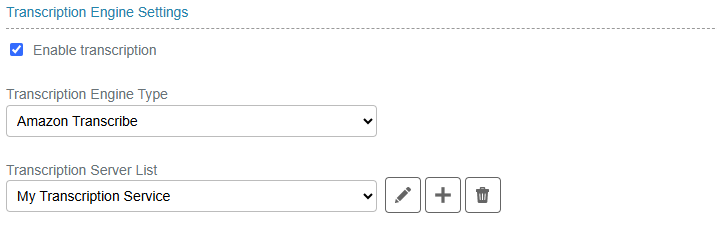
Figure 25: Amazon Transcribe Service Configuration
Next to the Amazon Transcribe Server List, are an Edit and Add button. Clicking either of these will pop up a new window where the Amazon Transcribe Server details can be configured.
-
Transcription service name – enter a name of your choice to designate this transcription engine.
-
Access Key ID – enter the access key for the Amazon account to be used for transcribing.
-
Secret Key – enter the secret key for the Amazon account to be used for transcribing.
-
Server Regions – select the region where the Amazon account resides from the drop-down.
-
Amazon S3 Location – enter the Amazon S3 storage location that will be used for uploading source audio files and holding transcription results files.
-
Content Redaction – click the button to configure content redaction.
-
Test Connection – click the button to test the settings entered in the above fields.
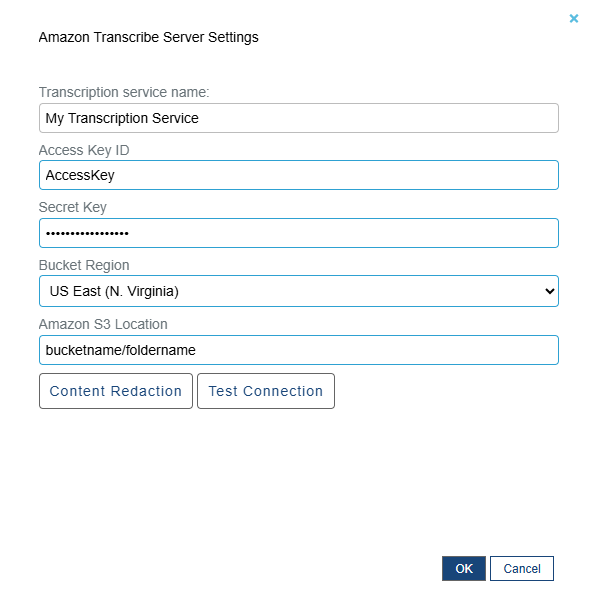
Figure 26: Amazon Transcribe Server Settings
Optionally, if you click on the Content Redaction button, you can configure the Amazon Transcribe service to redact certain information from the transcription results. Currently Amazon Transcribe only supports this feature for US English only. If Redaction is enabled, the language code for all transcriptions will be set to US English.
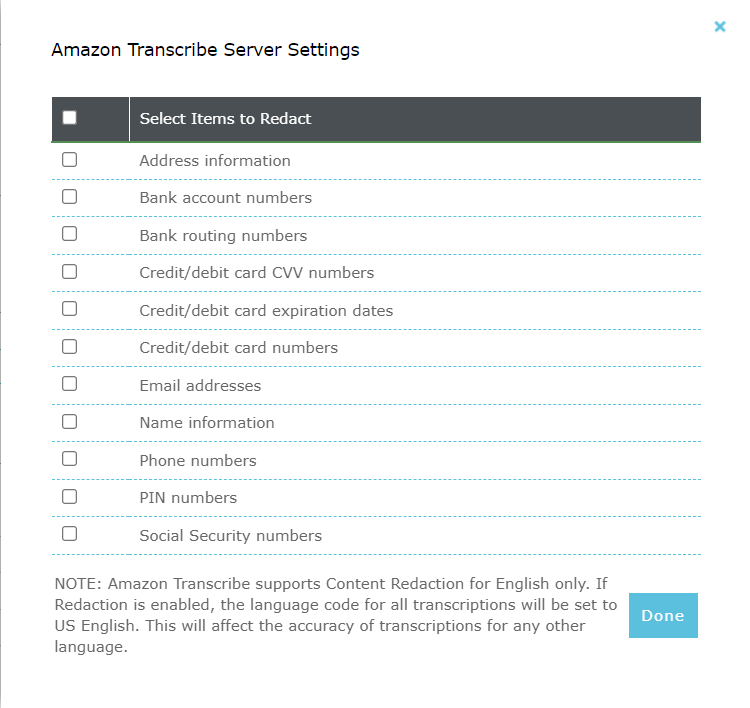
Figure 27: Amazon Transcribe Content Redaction Settings