SIP QMS Configuration
QMS version 7.4 or greater is required. The QMS configuration differs slightly depending on whether the third-party PBX is Microsoft Teams or not.
Microsoft Teams with Freeswitch
The QMS recording service must be configured with PBX Type: Microsoft Teams via SIP. You can change the PBX Type on the Services page in the QMS Client.
QMS users must be supplied with both an extension and a SIP address. The extension is the identifier as seen by FreeSwitch, e.g. if <sip:81180@10.213.6.21> is the SIP address of the user in FreeSwitch, we set the QMS user extension as 81180.
The SIP address is the address the users are identified in Microsoft Teams. This address is used by the CC Gateway components to be able to match CC users to QMS users for the purposes of user synchronization and sending recording flags etc.
Other PBX with Freeswitch
The QMS recording service must be configured with PBX Type: SIP. You can change the PBX Type on the Services page in the QMS Client.
QMS users must be supplied with an extension. The extension is the identifier as seen by FreeSwitch and is used by the CC Gateway components to be able to match CC users to QMS users for the purposes of user synchronization and sending recording flags etc.
Additional Configuration
Additional configuration of the recording service is required. Open QMSConfig.exe, found in the installation directory of the QMS recording service, click on "Advanced" and then "Recording Service":
-
EnableSipResolveAudioViaSDP set to True. Because all audio will be seen as coming from the same IP address (the FreeSwitch server), we need to use the IP/Port combination in the SDP to relate the audio to a specific user.
-
SipResolveAudioViaSDPNamedProxies = <IP address of FreeSwitch servers>. Because we see the SIP from FreeSwitch as a "SIP proxy" which we ignore by default, by adding the IP of FreeSWITCH to this configuration setting we can override this. Multiple FreeSwitch servers can be entered, separated by a comma.
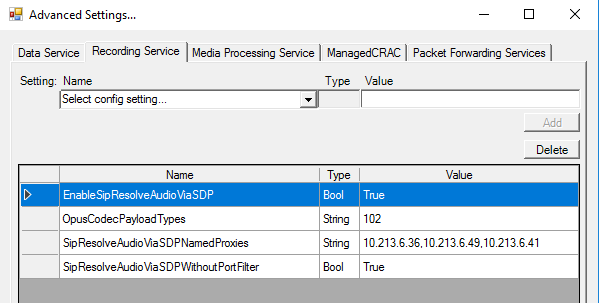
The following additional configuration settings are only optional:
-
OpusCodecPayloadTypes = 102. Use this setting if you are seeing FreeSwitch using opus audio (which it does support). Because the payload type for opus is dynamic you have to configure it here and will normally be 102 for FreeSwitch.