Override Evaluation Retention Settings
Evaluations by default do not have a retention schedule and are retained until deleted by an authorized user. A retention schedule for evaluations can be established by an Administrator in the General Settings area. (Evaluation Retention Settings). When an Evaluation retention schedule is established, Evaluations are deleted once a set number of days have elapsed since the creation of an Evaluation.
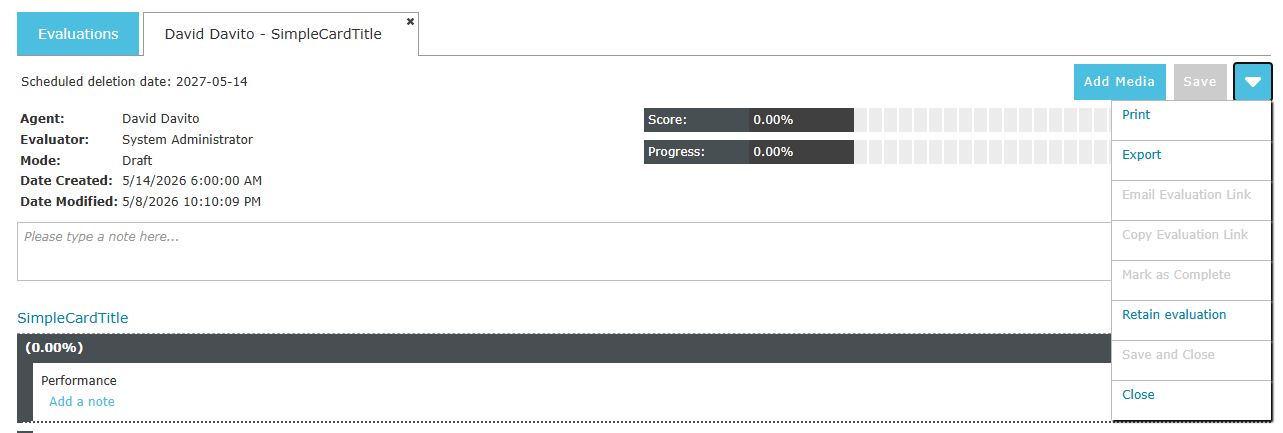
When viewing the details of an Evaluation that is subject to a retention policy the scheduled deletion date is visible at the upper left. If there isn’t an active retention policy no delete date will appear.
If an Evaluation is affected by a retention policy a user with the Override Media Retention Settings permission can exempt the Evaluation from the policy using the "Retain Evaluation" button in the drop down menu located at the top right of the Evaluation details tab. If the Evaluation is already being retained the menu item changes to "Release Evaluation" allowing the Evaluation to be subject to the retention policy again. When an Evaluation is release or retained the scheduled deletion date is updated to reflect the retention status.
|
A retained Evaluation can be released from the retained status by clicking the "Release Evaluation" menu item. Note that once an Evaluation has been retained it can still be manually deleted in the usual way. See Deleting Evaluations |
See Also: