Port Mirroring Integration Guide
QMS Call Recording software records and monitors calls by sniffing packets traverse across the data network. Packet sniffing is achieved by enabling port mirroring on the data switch. Port mirroring is supported by most data switches and when enabled will send a copy of every packet destined for one port to another port. The managed switch must support many to one port mirroring, mirroring both ingress (receive) and egress (transmit), and IP connectivity to the destination port.
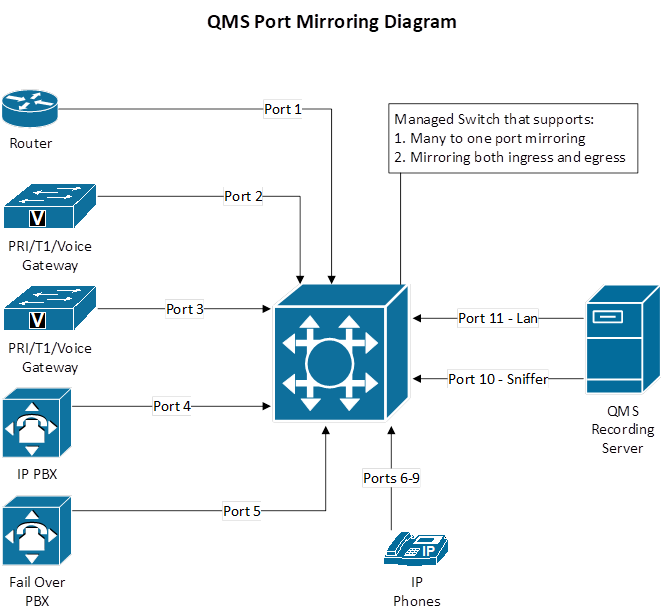
There are several types of port mirroring set-ups.
-
If you would like to record only inbound and outbound calls and not internal calls, you should mirror all PBX ports and trunk ports. In the diagram above, your source will be ports 2 through 5 (PBX/Trunk Ports) and your destination port will be port 10 (Quality Management). This only applies to PBXs on site.
-
If you have a hosted or offsite PBX (e.g. NEC, Covad, Sylantro, Broadsoft, or Tekelec), then you should set-up port 1 (router) as the source port and port 10 (Quality Management) as the destination port. This allows you to record all inbound and outbound calls but not internal calls. This applies to offsite PBXs.
-
If you would like to record inbound, outbound, and internal calls you should mirror all phone ports via a VLAN and setup the VLAN as the source port and port ten (Quality Management) as the destination. This applies to any PBX on- or off-site.
-
If this is a multi-site deployment then you can use a combination of the above port mirroring setups. Below are a few examples:
-
If you have two sites, both of which have PBXs, then you can use option one on both sides.
-
If you have a PBX/trunk on the main site and no PBX/trunks on the remote site, then you can use option one on the main site and option two on the remote site.
-
If you have a PBX/trunk on the main site and only a trunk on the remote site, then you can use option one for the main site and monitor port one (router) and port 2 and 3 (trunks) as source ports, and port 10 (Quality Management) as a destination port for the remote site.
-
There are a variety of port mirroring setups that can be utilized, however please consult an Enghouse Support Engineer prior to setting up port mirroring.
|
It is recommended that you do not set-up port mirroring on both PBX/trunk ports and phone ports. |
|
There is no setting within Quality Management Suite to record internal versus external calls. Quality Management Suite records based on the packets it gets via port mirroring. |
|
Some PBXs, like Avaya and ShoreTel, allow internal phone extension traffic to go through the PBX instead of the data switch. If you have configured your PBX to do this, then you can record internal calls via port mirroring on the PBX/trunk ports. |