Overview
QMS releases from 9.0 onward include integration with the Azure Transcribe Speech-to-Text service to provide transcription services for recordings. Recording profiles can be configured to automatically transcribe calls once the call has completed. This can be done for On Demand recordings as well. Recordings can be transcribed later through the client interface using the Transcribe Now feature.
Azure Transcribe supports many different languages and attempts to auto-detect the language being used within the call.
This document is intended to outline the general configuration and setup of transcription services within QMS. This document does not replace the Azure documentation for creating Speech Services (https://learn.microsoft.com/en-us/azure/cognitive-services/speech-service/speech-to-text) or Azure Blob Storage (https://learn.microsoft.com/en-us/azure/storage/blobs/storage-blobs-introduction) that should be used to setup the necessary Azure Transcribe services.
QMS with Transcription Topology
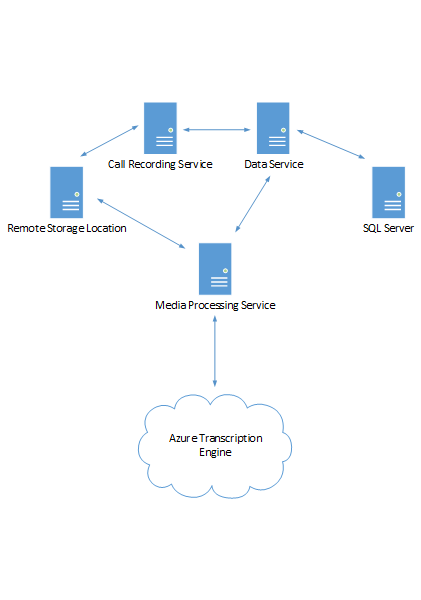
Figure 21: QMS with Azure Transcribe Speech-to-Text Service
A standard QMS deployment includes at least one Call Recording Service, Data Service, and Media Processing Service. Some deployments may include multiple instances of each of these services. Raw recording files are stored locally on the CR Service and is processed by the MPS once the call is complete. The MPS may store the recording locally or to a remote storage location, depending on the configuration.
If transcription is indicated for the recording, the MPS will also create a .wav and a .dat file that will be used to communicate to the Azure Transcribe service. The MPS sends the transcription request to the Azure Transcribe service, along with uploading the recorded audio to the Azure S3 location defined for the service. The MPS polls the Azure Transcribe service to get the results of the transcription job. MPS will continue with other processing until it receives a response from the Azure Transcribe service that the transcription is complete.
The transcription service may take a significant amount of time to process.
Once the Azure Transcribe service has finished the transcription the MPS will receive a response with the processed transcription data. At this time the MPS will replace the .wav and .dat files stored for the transcription with a .txt file that contains the transcription data. This data includes not only the call text, but also speaker information, timing of the phrases within the call, and accuracy or confidence data for the recognition.
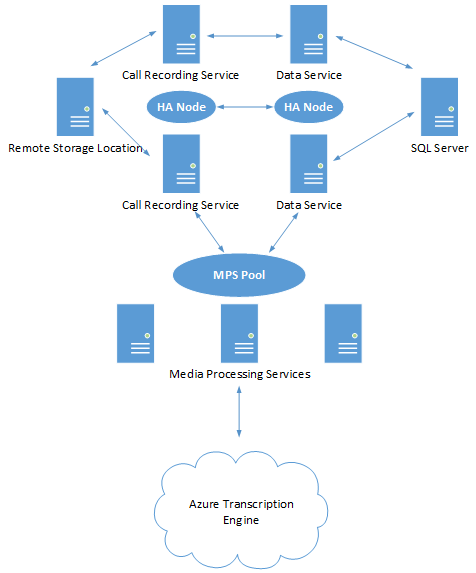
Figure 24: Highly Available QMS with Azure Speech-to-Text Service
The Highly Available deployment of QMS adds additional complexity. The Call Recording Service and Data Service would be setup as nodes with each service running on separate server instances. SQL also needs to be setup with Merge Replication and the data storage would need to be mirrored in some fashion to ensure no data loss. The MPS pool would service the HA deployment with two or more MPS running in conjunction.
The MPS connects and interacts with the Azure Transcribe service in the same fashion as before.