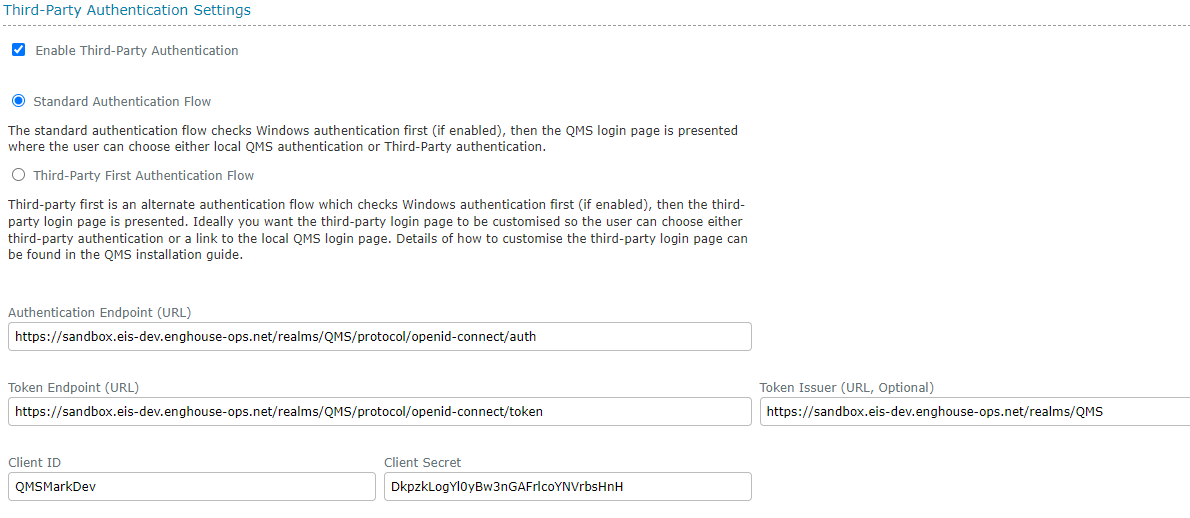
Third-Party Authentication Settings
Third-Party authentication can be enabled and connected to any OpenID compliant authentication service. You will need to have a client configured on the authentication service to represent the QMS application and know the ClientID and ClientSecret.
You can choose between two authentication flows:
-
Standard Authentication Flow: The standard authentication flow checks Windows authentication first (if enabled), then the QMS login page is presented where the user can choose either local QMS authentication or Third-Party authentication.
-
Third-Party Authentication Flow: Third-party first is an alternate authentication flow which checks Windows authentication first (if enabled), then the third-party login page is presented. Ideally you want the third-party login page to be customised so the user can choose either third-party authentication or a link to the local QMS login page. Details of how to customise the third-party login page can be found in the QMS installation guide.
The following fields are mandatory unless specified otherwise. If not known, the endpoint values can be obtained from the configuration URL of the third-party authentication provider which returns a JSON message containing this information:
-
Authentication Endpoint: The OpenID authentication endpoint of your chosen authentication provider. This is the URL which will initiate the authentication process.
-
Token Endpoint: The OpenID token endpoint. This is the URL which exchanges the authentication code obtained from the authentication endpoint with a JWT token containing the user information. The QMS dataservice must be able to reach the Token Endpoint entered here.
-
Token Issuer (optional): The token issuer URL of the third-party authentication provider. This URL must match the ISS value returned in the auth token to be valid. If no Token Issuer URL is supplied, this additional security step is ignored.
-
ClientID: The client identifier which represents your QMS system on the authentication provider.
-
ClientSecret: The secret key which identifies your QMS client on the authentication provider. This should only be known between the QMS system and the authentication provider.
We recommend using KeyCloak or Microsoft EntraID as authentication providers as these two have been verified as compliant with QMS authentication, however any OpenID compliant authentication service should be compatible.