SIP Packet Forwarding Service Configuration
The Enghouse Packet Forwarding Service needs to be installed on the same server as FreeSwitch. This component is responsible for forwarding SIP and RTP packets to a QMS recorder. RTP audio must not be encrypted.
Refer to the separate document "QMS Packet Forwarding Service Installation Guide.pdf" for instructions on installing the Packet Forwarding Service.
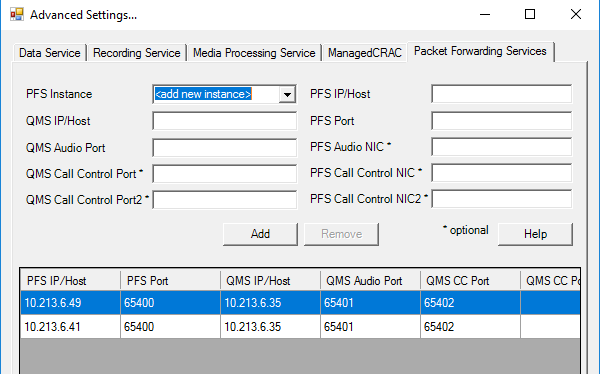
To configure the PFS to connect to the QMS recording service open QMSConfig.exe, found in the installation directory of the QMS recording service, click on "Advanced" and then "Packet Forwarding Services":
-
Create a new PFS Instance
-
Enter PFS IP/Host (the server hosting the PFS) and PFS Port (normally 65400)
-
Enter QMS IP/Host (the server hosting the QMS recording service), QMS Audio Port and QMS Call Control Port.
-
Add one instance for each PFS in your environment. Multiple PFS instances can deliver audio and call control to the same ports on your recorder.