Desktop Agents
The Desktop Agent is the screen recording client that is installed on an agent’s PC. Deployment Profiles make it easy to install and pre-configure the Desktop Agent on a remote agent’s PC, for example for agents working from home, without the agent having to enter the server settings themselves.
Each deployment profile stores the settings the Desktop Agent needs to connect to QMS: the server, the screen capture interval, whether to use SSL, and an optional client secret. Each profile provides two download links:
-
Installer (.msi): the shared DesktopAgent.msi installation package.
-
Configuration (.mst): a profile-specific MSI transform file containing the settings from the profile, including the client secret if one is set.
Users with the Change System Settings permission in their Security Profile can manage deployment profiles. Deployment profiles are not specific to a tenant. On a multi-tenant system the Desktop Agents section is only available when viewing the Provider tenant.
To view the deployment profiles click the  navigation icon and then click the Desktop Agents link from the administration sub-menu. The Desktop Agents tab displays the Deployment Profiles table containing the following columns:
| Column | Description |
|---|---|
Name |
The name of the deployment profile. |
Server |
The hostname or IP address the Desktop Agent connects to. |
Capture Interval (ms) |
How often, in milliseconds, the Desktop Agent captures the agent’s screen. |
SSL |
Whether the Desktop Agent uses SSL to connect to the server (Yes or No). |
Installer URL |
The link to download the installer (.msi). Click the copy icon to copy the link to the clipboard. |
Configuration URL |
The link to download the configuration file (.mst). Click the copy icon to copy the link to the clipboard. |
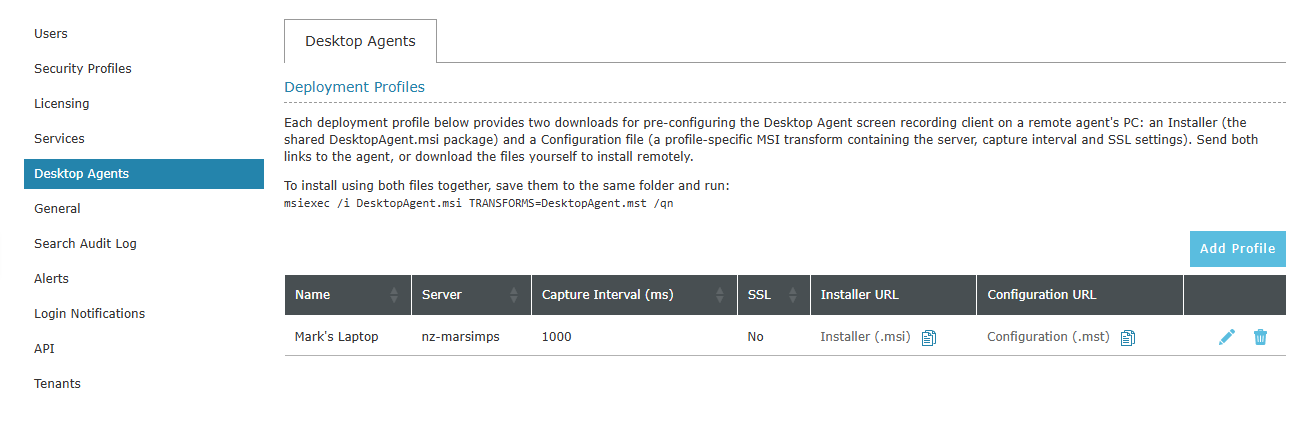
Use the edit and delete icons at the end of each row to edit or delete a profile. Click the Add Profile button to add a new profile.
Installing the Desktop Agent using a deployment profile
To install the Desktop Agent on an agent’s PC using a deployment profile, complete the following steps:
-
Copy the Installer URL and Configuration URL from the deployment profile and send both links to the agent, or download both files yourself.
-
Save both files to the same folder on the agent’s PC, named DesktopAgent.msi and DesktopAgent.mst.
-
Run the following command from that folder:
msiexec /i DesktopAgent.msi TRANSFORMS=DesktopAgent.mst /qnThe
/qnoption installs the Desktop Agent silently.
|
The files are downloaded from the QMS Data Service file host (port 8038 by default), so the agent’s PC must be able to connect to that port on the server. Agents working remotely may need to be connected to the corporate network (for example by VPN), or the server needs to be accessible to them. |
|
The installer and configuration links can be downloaded without logging in to QMS, and the configuration file contains the profile’s client secret. Only send the links to the agents who need them. Deleting the profile stops its links from working. |
For other ways of installing the Desktop Agent, such as using the Desktop Agent Deployment Tool or installing it manually, see the Desktop Agent Deployment section of the Screen Recording guide.
See Also: