On Demand Text Recording Translation
Users with the On-Demand Text Translation permission in their Security Profile can initiate a translation of a text (Transcription, Email, SMS, Webchat or UCMessage) recording on demand. For details regarding On Demand Translation Settings see On Demand Translation Settings
To translate a text recording click the  navigation icon. The Recordings tab displays containing the search criteria bar and the search results table. Complete the following steps:
-
Click the Search button. The call recordings satisfying the search criteria are listed. Translatable Recordings will display these icons:
 (Transcription),
  (Email),
  (SMS),
  (Webchat) and (UCMessage).
 -
Left click the recording you wish to translate and click the Details button in the context menu.

-
While viewing the original text recording details, right click the
 Show additional menu options button.
 -
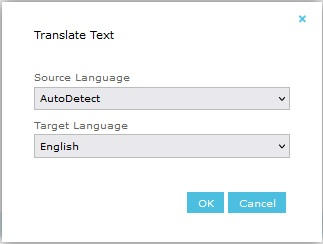
Select Translate Text from the menu. This will open the "Translate Text" dialog where the original text source language and translation target language are specified.
-
The Source Language defaults to "AutoDetect" but a specific language can be selected from the drop-down.
-
The Target Language is selected from a drop-down offering up to 75 languages.
-
Once the Source and Target Languages have been selected, click the OK button. The dialog will dismiss and the translation request will be processed. If an error is detected in the request, a dialog will be displayed; otherwise, the requested translation should be performed.
-
Wait for the transcription to complete (translations typically complete quickly but it could be several minutes)
-
Reload the text recording tab to display the translation. The original text and each translation will displayed on sub-tabs. If the recording has a summary, it is translated along with the text and displayed in the same language tab.
-
FYI: Translation requests will trigger an entry in the Audit Log.
|
Translations created before QMS 12.3 do not include a translated summary. A language that has already been translated cannot be translated again, and requesting it displays an error that the translation already exists. |
See Also: