Step 3 – Install or Upgrade QMS on the Primary Server
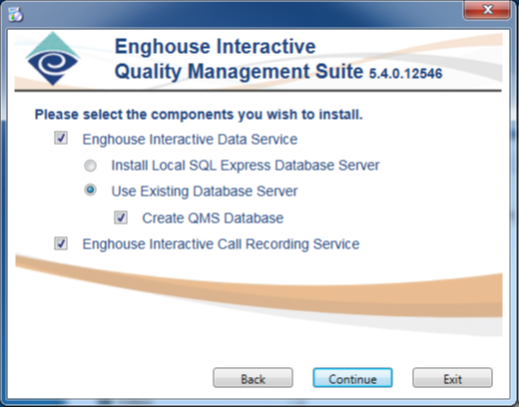
Although other topologies may exist, this guide will focus on the scenario where the Primary QMS Server will host the Primary Call Recording Service and the Primary Data Service. Follow the instructions listed in the QMS Installation Guide to install both components. At the selection screen, you will want to ensure that both the Data Service and Call Recording Service installs are checked. Also, select the "Use Existing Database Server" and check the "Create QMS Database" as we’ve already installed the Primary Database in Step 2. The installer will install any necessary pre-requites along with the QMS software and database.
If you have a QMS solution already in place, you can simply upgrade your primary QMS system, however, note that if your QMS is presently utilizing SQL Server Express as your database, you will need to upgrade that database to Standard Edition.