QMS Recording Service
The QMS Call Recording service is responsible for creating voice recordings. A minimum of one Recording Service must be present in a QMS deployment but many of them can be deployed in a wide variety of configurations in a single QMS deployment with a single Data Service. Groups of users are assigned to a call recording service and the service will record only the phone calls for those users that have been assigned to it.
The Recording Service is also responsible for:
-
Determining if a recording should be made based on defined policies
-
Streaming live audio to connected clients during live monitoring sessions
-
Sending call state updates to the Data Service
-
Sending recording metadata to the Data Service
-
Sending email alerts when an alert condition is hit
-
Sending raw audio files to the Media Processing Service for conversion
Audio Collection
The Recording service must be connected to an audio source for the calls that it records. This source is typically a network switch that supports mirroring of ports from one or more network switches, or mirroring of virtual LANs (VLANs), where the mirror port is connected to a dedicated secondary network interface card residing in the server running the Recording Service. Some PBX systems can operate without requiring network switch mirroring in some circumstances. Those are:
-
Cisco UCM – Most Cisco phones have a Built-in-Bridge (BIB) that can be configured to stream audio to the Call Recording server. Many Cisco partners find this solution easier to configure initially because they do not have to have knowledge of network data switches in order to start recording calls. Network mirroring is also supported with Cisco and both approaches should be considered when designing a Call Recording Service deployment for Cisco.
-
Mitel 3300 – With Mitel, a component called Mitel SRC (or Mitel Border Gateway) can be installed which will deliver encrypted audio directly to the Call Recording Service. Network mirroring is also supported as long as media encryption has been turned off on the Mitel server.
-
Microsoft Lync / Skype for Business – There are numerous options for audio collection in a Microsoft Skype for Business deployment.
-
Avaya Communication Manager – When using Avaya DMCC software and licenses, call audio will be streamed directly from the Avaya system to the Call Recording service. Network mirroring based recording is also supported.
When network mirroring is being used as the audio source, it is important to make sure that all of the sources of RTP (real-time protocol) packets, for calls that need to be recorded, are included as part of mirroring configuration. For example, if the customer only needs to record inbound and outbound calls to and from the public telephone network then the mirroring configuration can be as simple as copying all packets going to or coming from the voice gateway or PBX (whichever is connected to physical trunks). If internal calls need to be recorded in addition to external calls, the mirroring configuration can be a bit more complicated as it requires the packets going to and from every recorded phone device to be copied to the mirror port on the network switch. For larger deployments, that usually involves either using network switches that support VLAN mirroring or mirroring a series of chained-together switches to a single mirror port.
The following audio codec payloads can be captured:
-
G.711 PCMA/A-Law
-
G.711 PCMU/μ-law
-
G.729 Simple / G.729A
-
G.722
-
Siren7 (Skype for Business deployments only)
-
Red (Skype for Business deployments only)
-
RTAudio (Skype for Business deployments only)
-
SILK (Skype for Business deployments only)
-
iLBC (Cisco deployments only)
-
iSAC (Cisco deployments only)
-
Opus (Cisco deployments only)
Final recordings are saved as single or dual-channel .opus files with Opus encoded audio or.mp3 files with MP3 encoded audio.
Call Event Collection
A source of real-time phone call events is also required by the Call Recording service. The call events tell the Call Recording service information about a phone call such as which parties are involved in the call and when the call starts and ends. The source of these events is highly dependent on which PBX system is being used and in some cases there is more than one option available for a given PBX system.
The required event sources for each PBX system are as follows.
| Call Event Source | Additional requirements | |
|---|---|---|
Avaya Communication Manager |
Avaya DMCC. No installation on server required. |
Avaya Application Enabled Services (AES) server is required in both cases. |
Avaya IP Office |
Avaya TAPI software must be installed on Call Recording server. |
|
Avaya CS1000 |
Enghouse Interactive CTI Connect must be installed on Call Recording server. |
Avaya Meridian Link Services (MLS) server. |
Cisco UCM |
Network mirroring (when using network mirroring for audio). Cisco TAPI service provider (when using Built-in-Bridge for audio) – must be installed on Call Recording server. |
Please see Appendix A for OS requirements. |
Microsoft Skype for Business |
QMS NetService must be installed on Skype for Business Front End servers. |
|
Microsoft Teams with Enghouse Contact Center |
Network mirroring |
|
Microsoft Teams Native |
Microsoft API |
|
Innovaphone |
Innovaphone TAPI must be installed on the Call Recording server. |
|
Mitel |
Mitel MiTAI software must be installed on Call Recording server. |
|
NEC Forked Audio |
NEC OAI |
|
NEC (all other) |
Network mirroring. |
|
ShoreTel |
ShoreTel TAPI service provider must be installed on Call Recording server. |
|
Generic SIP |
Network mirroring. |
Deployment Configurations
If more than one type of PBX system is deployed in the customer environment then separate Call Recording Services should be deployed for each PBX type. In some cases, Call Recordings services can be deployed at remote sites to handle Call Recording for the users at those sites.
Single-Site Single-Server Configuration
Both the Data Service, SQL database, and Call Recording Service can be installed on the same server for small or medium sized deployments of up to 100 simultaneous recordings.
High-load Single Site Configuration
In high load situations, where the number of simultaneous recordings will exceed the capabilities of a single server, additional recording services can be deployed on separate servers at the same site. The servers will not automatically load balance so care should be taken to assign users to the recording servers in a way that will equally distribute the load. In this scenario, the Data Service should be running on a dedicated server.
Distributed Multi-Site Configuration
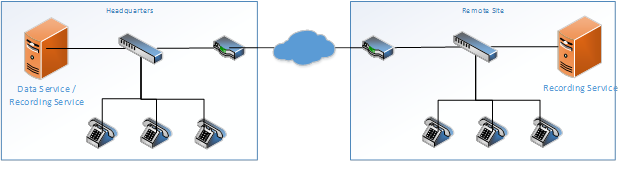
In many cases, especially when using network mirroring as the audio capture method, instances of the Recording Service should be placed in the same physical location as the phones being recorded. This reduces WAN bandwidth requirements since captured audio does not need to be copied over WAN connections. For small sites, the Recording Service can be run within a virtual machine which minimizes hardware investment. Running the recording service at each site also improves overall resiliency since recording will not be interrupted in the case of WAN outages.
Server Virtualization
The Recording Service can be run in both VMWare and Microsoft Hyper-V server virtualization environments. Live server migration systems, such as VMWare vSphere vMotion, should not be used. Virtual machines must have a dedicated MAC address on all virtual network adapters that must not change.
When network mirroring is being used as the call audio source and/or call event source, the virtual machine must have a virtual network adapter that is bound to a physical network adapter on the host machine. The physical network adapter must then be plugged into the mirror port on the network switch and that adapter must not be used by any other virtual machine on the host system. Promiscuous mode support must be enabled in the physical-to-virtual adapter binding settings. This option is not available with all versions of Microsoft Hyper-V so and additional software component called the QMS Packet Forwarding Service is required in that case.
The QMS Packet Forwarding Service is a service that is installed on Hyper-V host machines and can be installed on both GUI and Server Core installations of Windows. The Packet Forwarding Service listens for packets on a dedicated network capture card that is plugged into a network port mirror. The service filters out all packets except for those necessary for recording and forwards them to the destination address of the QMS Recording Service. See QMS Packet Forwarding Service Installation Guide for more details.
Call Recording Service System Requirements
Servers running the Call Recording Service must meet the following requirements.
Call Recording Service Software Requirements
Supported Operating Systems:
-
Microsoft Windows Server 2025
-
Microsoft Windows Server 2022
-
Microsoft Windows Server 2019
-
Microsoft Windows Server 2016
-
Microsoft Windows 11 Professional
-
Microsoft Windows 10 Professional
Not all operating systems are suitable for all deployments. Client operating systems such as Windows 10 and 11 cannot be used in ShoreTel deployments and have significant limitations in other deployments. The Screen Recording add-on may not be used in deployments in which the Recording Service is running on a client OS. 64-bit editions of Windows Operating Systems are not supported for installations using Cisco Unified Communications Manager prior to version 8.5.
Any anti-virus package can be used with QMS. However, when installed it is recommended that QMS folders are excluded from any virus scans. The location of the QMS folders is configurable. The folders that should be excluded are:
-
The QMS logs folder. This is typically located at C:\ProgramData\CallRex
-
The folder that holds recordings. This is configured for each Recording service and is viewable in the Services section in the QMS Client.
Call Recording Firewall Configuration
The Recording Service requires the following ports to be open for inbound connections:
| Port | Protocol | Description |
|---|---|---|
4533 |
TCP |
Client connections for live monitoring |
8005 |
TCP |
Web services for Data Service |
8006 |
TCP |
Web services for Desktop Agent (legacy – pre QMS 5.2) |
8008 |
TCP |
Messaging from NetService (Skype for Business deployments only) |
8009 |
UDP |
Audio from RTP Data Collector (Skype for Business deployments only) |
8010 |
TCP |
Web services for contact center integrations |
8012 |
TCP |
Web services for custom PBX integrations |
8016 |
TCP |
Web services for Desktop Agent (QMS 5.3 and later) |
8022 |
TCP |
Communications from Data Service |
8023 |
(TCP) |
Call Recording Deployment Service to allow RTPDCs to auto update |
8026 |
TCP |
SignalR service for Desktop Agent (QMS 9.3 and later) |
5060 |
TCP/UDP |
Cisco Dual Media Streaming only – SIP communications |
8901 |
TCP/UDP |
Cisco Dual Media Streaming only – RTP communications |