Step 8 – Administering Distributed Transaction Coordinator
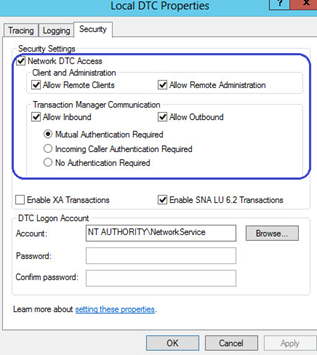
This step will need to be done on both the Primary and the Secondary QMS Server only in SQL Server Always On Cluster scenarios. DTC is not required for Merge Replication or remote database scenarios. Open the Local DTC Properties window by opening Administrative Tools → Component Services. Double click Computers, My Computer, and Distributed Transaction Coordinator. Right Click Local DTC and click properties. Then select the Security Settings. Verify that Allow Remote Clients and Allow Remote Administration are checked. Also Allow Inbound and Allow Outbound should also be checked. Mutual Authentication should be required. Once saved, ensure that the services are set to Start Automatically in the services window. See the image below: