Forked Audio – Network-based recording
Network-based recording is very similar to IP phone-based recording; the inbound and outbound RTP audio streams are forked (copied), with the duplicate streams being sent to the QMS server for recording a call. The difference between the two types of forked audio recordings is the device that does the forking of the audio streams. With network-based recording, the IP phones do not fork the audio; rather, another device registered with CUCM does the forking of the audio streams. This device could be a Cisco Voice Gateway, a Cisco Unified Border Element (CUBE) device, a Media Termination Point (MTP), or a Trusted Relay Point (TRP). From the QMS server’s perspective, all of the audio is coming from one source IP address. In order to distinguish which audio streams belong to which agent, using just the IP address will not work in this scenario. Therefore, each agent will be assigned a port, such that the IP address/port combination will be unique per agent. QMS will then be able to create call recordings for each agent that contains the correct audio streams.
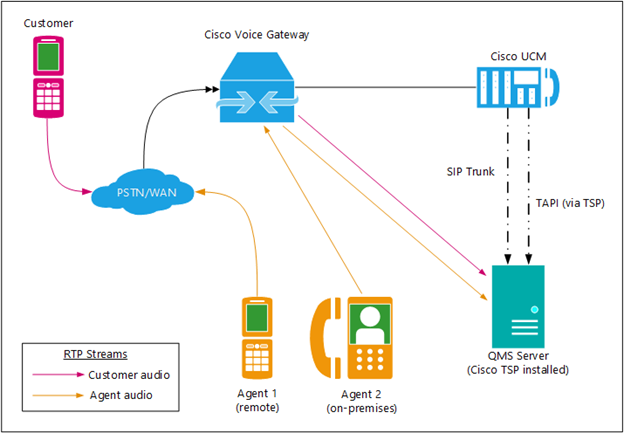
Figure 3: Forked Audio – Network-based recording configuration
PBX Configuration
-
Configuration of the various network-based recording devices within CUCM is beyond the scope of this document. Please refer to the appropriate Cisco documentation regarding setup and configuration of Voice Gateways, CUBE devices, MTPs, or TRPs as necessary.
-
The steps outlined in the PBX Configuration section under Forked Audio – IP Phone-based Recording above also apply to network-based recording. Follow the steps outlined in that section to set up the necessary profiles, application (TSP) user, SIP trunk, and phone settings.
TSP Configuration
-
The steps outlined in the TSP Installation and Configuration section under Forked Audio – IP Phone-based Recording above also apply to network-based recording. Follow the steps outlined in that section to set up the TSP for network-based recording.
QMS Configuration
-
The steps outlined in the QMS Configuration under Forked Audio – IP Phone-based Recording above also apply to network-based recording. Follow the steps outlined in that section to set up the QMS services and users. After those steps have been completed, the following settings need to be added to the CallRecordingService.exe.config file, located in the QMS installation folder, in the
<Recording />section. The key names are case-sensitive. -
DisableCiscoFADynamicAudioPorts: The configuration setting that turns on/off the use of dynamic ports for Forked Audio recording. Setting this value to true will be used for IP phone-based recording, where audio is being forked at the phone level, meaning the audio streams will be sourced from the IP address of each user’s phone. Setting this config value to false turns on dynamic ports, allowing network-based recording where all audio streams come from one IP address.
-
DisableCiscoFADynamicAudioPortUserPersistence: This configuration setting specifies whether associations between users and unique ports are maintained when a user is idle. If this value is set to true, when a user moves into an idle state, the ports assigned to that user are returned to the pool of available ports. If this value is set to false, which is the default, the user/port associations are maintained regardless of user state.
-
CiscoFADynamicAudioPortBase: This configuration setting sets the first audio port in a range of ports to be used in network-based recording. The default audio port base is port 16000.
-
CiscoFADynamicAudioPortRange: This configuration setting sets the number of ports available for dynamic port assignment in a network-based recording scenario. With allowances for RTP Control Packet (RTCP) traffic, the minimum number of ports per user is 8, while the maximum number of ports per user is 10, which allows for more intuitive interpretation of port usage when reviewing logs. The default port range is 2000, which will accommodate persistent port assignment for 200 users.
-
EnableParseCiscoFASIPMessageWithContent: Setting EnableParseCiscoFASIPMessageWithContent to true enables parsing SIP messaging containing embedded new lines in fragmented tcp packets. This setting can cure an issue that often presents as one party starting to record late in a call or not at all.
|
The default values for CiscoFADynamicAudioPortBase and CiscoFADynamicAudioPortRange specify a default port range of 16000 – 17999. |