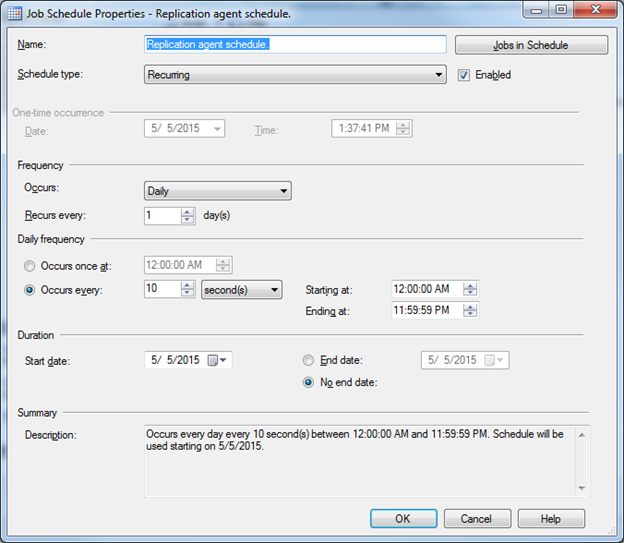
Step 14.16 – Setup the Replication Schedule
The next step will be to set the replication schedule. This schedule is how often the Publisher/Subscriber databases are reconciled and the data replicated. The default is once per hour, but this means that if QMS fails over to the secondary server, the data could be as much as an hour stale. So, we want to adjust that to a smaller amount. The minimum schedule is every 10 seconds. That is the recommended schedule. In Management Studio, expand SQL Server Agent → Jobs and find the QMS Publication to Subscription job similar to this:
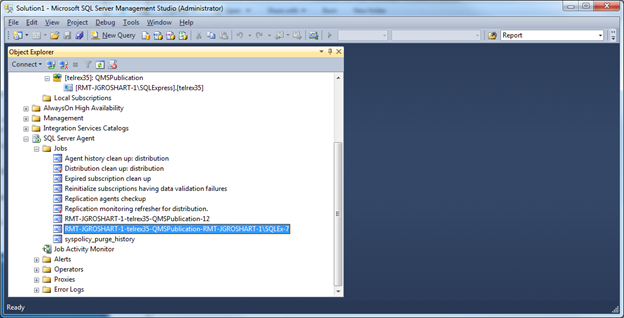
Right click and select properties of this Job. Click the schedules Page and you should see something similar to this:
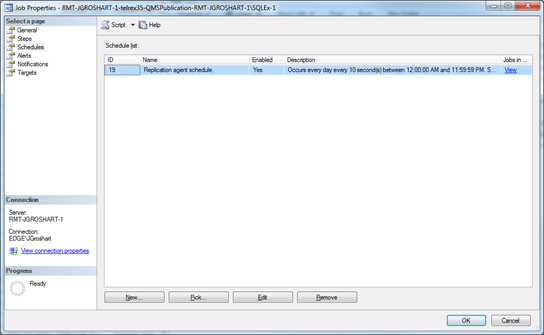
Select the Replication agent schedule and click the Edit button. This should bring up the following screen. The Frequency should indicate Daily and the Daily Frequency should Occur every 10 seconds. Update these settings and click OK. Then OK again and the schedule should be updated.