Media Processing Service Notifications
Media Processing Service notifications can be configured to be sent via email and/or to the Windows event log. These alerts need to be enabled on the Services page of the Administration section in the web client. Choose the media processing service from the list of services you wish to add the alerts to.
If using email alerts, you will need to know the authentication type, address, port and credentials of the email server. Multiple email addresses can be entered to receive the alerts, separated by a comma.
Test your email settings are correct with the "Send Test Email" button on this page (top right). A restart of the data service is not required after saving these settings.
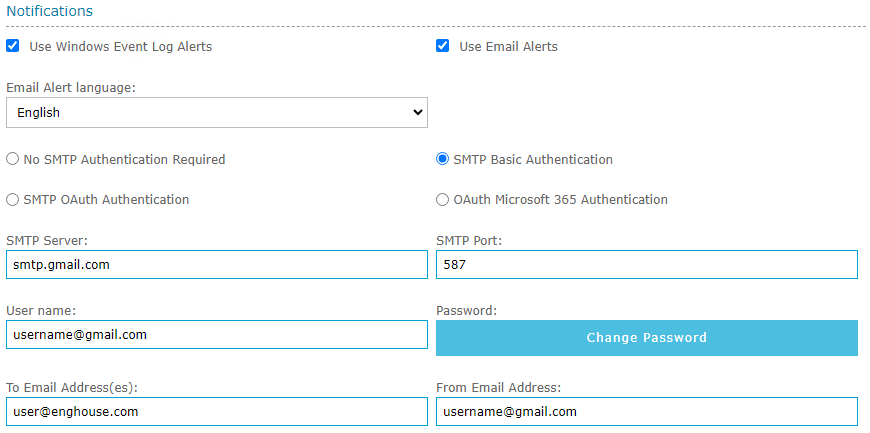
|
This category of alert is generated by the Media Processing Service. If the Media Processing Service is not running these alerts will not be triggered. These events are logged a Windows Event Log called "Call Recording" with an event source called "Call Recording Alerting" |
The following notifications can be triggered by this category of alert:
| Alert Type | Description |
|---|---|
Unhandled Exception |
The media processing service was restarted after an unexpected error condition. |
Data Service Connection |
The media processing service has lost connection to the specified data service. There is a known defect where this message says "recording service" when in fact it is from the media processing service |
Database Error |
An error occurred while accessing the QMS database. Currently this is only triggered while processing unconverted or un-transferred files |
File I/O Error |
The media processing service cannot read or write files to the hard drive. |
File Delete Error |
The media processing service cannot delete a recording. |
File Transfer Error |
The media processing service cannot transfer a file to remote storage. |
Disk Space Low |
The available disk space for recording storage has fallen below the configured threshold. Limited to one alert per day |