Changing Language
The Quality Management Client has been translated into a number of international languages. You can set the display language on the Login page. Select a language from the drop down list on the top right of the login page.
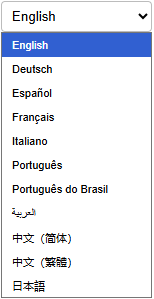
The languages supported by the Quality Management Client are:
-
English
-
German
-
Spanish
-
French
-
Italian
-
Portuguese
-
Portuguese (Brazilian)
-
Arabic
-
Chinese (Simplified)
-
Chinese (Traditional)
-
Japanese
The page will reload and display in the selected language. This language will be remembered for all subsequent visits to the Quality Management Client.
|
If you have already logged in you can also change your language from the Preferences link in the top navigation bar. |