Login Notifications
A login notification is a rich text message that will be presented to QMS users when they login. The login notifications section is the place where you can manage all notifications. To be able to access this section, users need to have Change System Settings permission in their profiles.
Users with the Change System Settings permission in their Security Profile can add or edit a Login Notification.
To view Login Notifications, click the  navigation icon and then click the Login Notifications link from the administration sub-menu.
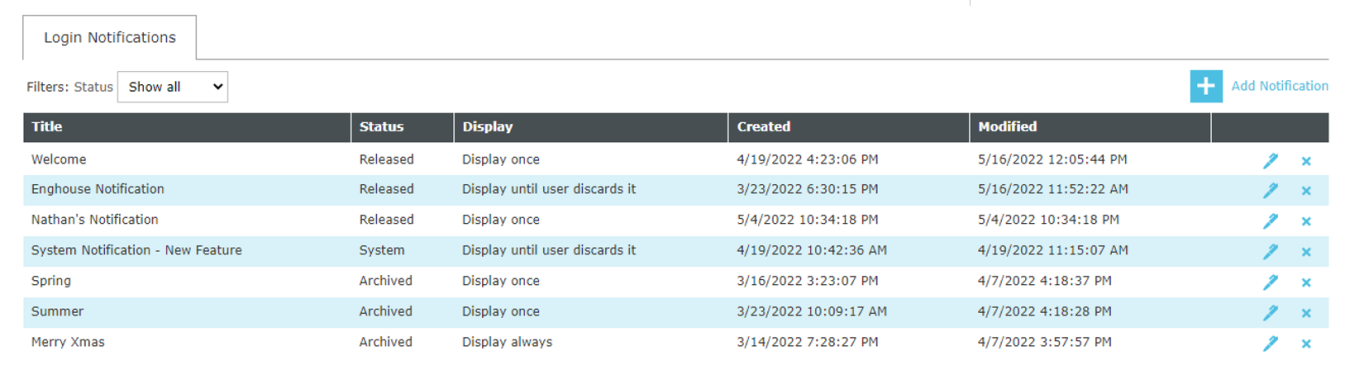
Notifications can be filtered, added, edited or deleted.
Filtering the Notification List
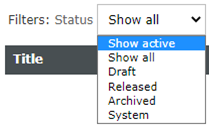
The status filter allows us to show only the notifications that match the selected status:
-
Show active: Displays release and draft notifications.
-
Show all: Displays all notifications.
-
Draft: Displays only draft notifications. Draft notifications are notifications that are still being prepared/written and are not presented to the users yet.
-
Released: Displays release notifications. Released notifications are notifications that are presented to the users when they login.
-
Archived: Displays archived notifications: These notifications are still in the QMS database but they will not be present to the users anymore. Obsolete notifications should always be set as archived.
-
System: Displays system notifications: These are read-only system notifications that cannot have their content changed by any user. System notifications will be presented to users until they dismiss them.
See Also: