Override Recording Retention Settings
New in QMS 7.1 is the ability to override the recording retention settings for specific recordings. Recording retention settings can be configured globally (General Retention Settings) or at the recording profile level.
When viewing a recording that will be affected by an active retention policy, the scheduled deletion date will now show on the top left of the recording details tab. If no retention policy is in place then the scheduled deletion date will display “never” e.g.

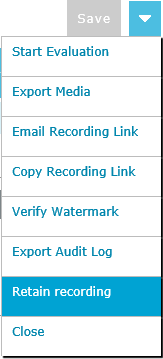
To override the scheduled deletion date open the drop down menu located at the top right of the recording details tab and click the Retain Recording menu item. If the recording is already retained, this menu item will read "Release Recording" and will allow the recording to be released from retention and the original scheduled deletion date applied (if there was one).
|
|
A retained recording can be released from the retained status by clicking the "Release Recording" menu item. Note that once a recording has been retained and the scheduled deletion date removed, the recording can still be manually deleted in the usual way. See Deleting Recorded Media |

See Also: